

+918048093623

Currently it only shows your basic business info. Start adding relevant business details such as description, images and products or services to gain your customers attention by using Boost 360 android app / iOS App / web portal.

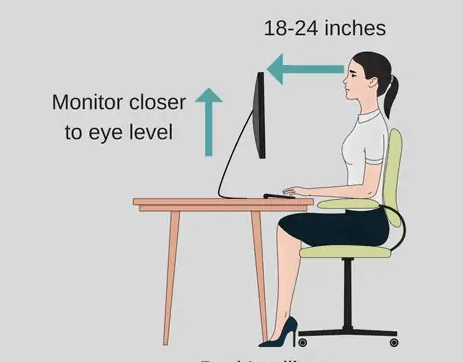
Here’s a ready-to-publish blog draft for you, Dr. Om Patil 👇 ⸻ Office Ergonomics for Computer Workstations By Dr. Om Patil – Spine Surgeon in Mumbai SpineWala | Your Back in Action Introduction In today’s digital era, many of us spend more than 8 hours a day at our desks. Poor posture and improper workstation setups are leading causes of neck pain, shoulder stiffness, back discomfort, and even long-term spinal problems. As a spine specialist, I often see patients whose pain begins not in the gym or on the road—but right at their desks. 1. The Ideal Sitting Posture • Chair Height: Adjust so your feet rest flat on the floor and knees are at a 90°–100° angle. • Back Support: Use a chair with lumbar support or add a small cushion to maintain the natural curve of your lower back. • Hips and Elbows: Keep hips slightly above knees and elbows close to the body, forming an L-shape. • Avoid Slouching: Sit back in your chair, ensuring your shoulders are relaxed and not hunched forward. 2. Monitor Position • Top of Screen at Eye Level: The upper third of your monitor should align with your eyes. • Distance: Keep the screen about an arm’s length away (~20–28 inches). • Avoid Glare: Adjust lighting or use an anti-glare screen filter. 3. Keyboard and Mouse • Keep Them Close: Position both at elbow height to avoid reaching forward. • Neutral Wrist Position: Use a wrist rest or type with relaxed wrists—not bent upward. • Mouse Grip: Move from your shoulder, not your wrist, to reduce repetitive strain. 4. Desk Setup • Declutter: Keep essential items within easy reach. • Document Holder: Use a stand beside your monitor to reduce neck movement. • Footrest: If your feet don’t touch the floor, use a small footrest to maintain circulation. 5. Movement is Medicine Even perfect posture isn’t enough if you stay static all day. • Take Micro-Breaks: Stand, stretch, or walk for 2 minutes every 30 minutes. • Do Desk Stretches: Neck rolls, shoulder shrugs, and gentle spinal twists can reduce stiffness. • Eye Health: Follow the 20-20-20 rule — every 20 minutes, look 20 feet away for 20 seconds. 6. Ergonomic Accessories • Adjustable Chairs with lumbar support • Sit-Stand Desks to alternate between sitting and standing • Ergonomic Keyboards that reduce wrist strain • Monitor Arms for flexible positioning 7. The SpineWala Advice Your workstation should adapt to you, not the other way around. Minor ergonomic improvements can prevent major spine problems. If you’re already experiencing back or neck discomfort, consult a spine specialist early to prevent chronic issues. ⸻ 🌐 Websites: Endospineworld.com | Spinewala.com 📞 Contact: 9819191896 , 9819195885 📍 Clinics: 117, Broadway Healthcare, Dadar East, Mumbai 505, Cozderm Skin Clinic, Above ACME Hospital, Chembur East, Mumbai #spinesurgeoninmumbai #spinewala #sciatica #DrOmPatil #Spinewala #YourBackInAction #SpineSurgeonMumbai #EndoscopicSpineSurgery #MinimallyInvasiveSpineSurgery #SpineHealthMatters #BackPainRelief #CervicalSpineCare #LumbarSpineSurgery #PostureCorrection #OfficeErgonomics #HealthySpineHealthyLife #WorkstationWellness #SitRightMoveMore #NeckPainPrevention #BackCareTips #SpineAwareness #PainFreePosture #SpineWalaChallenge .


